


010 447 2445Contact
Arke Technologies home
Close-up of rack-mounted servers with their status lights on.

Servers and IT hardware supply for South African organisations

Arke Technologies supplies servers, storage, racks, networking equipment and laptops to mid-sized and large organisations, public bodies and schools across South Africa, then installs and supports them under one contract. The hardware comes through Server Hub, our trading division, priced in rand with VAT included and backed by a local warranty.

Servers: meaning and definition

In computing, a server is a computer, or a program running on one, that provides a service to other devices on a network: shared files, email, databases, websites, sign-in, name lookups or the correct time. The devices it serves are its clients, and the pattern of clients and servers is how almost every business system works, from the finance department's accounting database to a school's learner records.

A server computer is built to run continuously, so it carries redundant power supplies, error-correcting memory and drives that can be swapped while it runs. It is managed remotely through a dedicated controller, such as iDRAC on Dell PowerEdge servers or iLO on HPE ProLiant servers, and it lives in a rack or a cool, locked room rather than under a desk.

The word has other meanings, which is why a search for servers also returns dining room servers and side servers (sideboards), salad servers and wooden servers for the table, the fastest tennis servers and online game servers. This page is about computer servers and the hardware around them, one of our services.

Rows of server racks with red and blue patch leads behind perforated doors.

What we supply and support

The hardware comes through Server Hub, our hardware division, from a catalogue of more than 26,000 products, configured and bench-tested before dispatch; our team designs it in, installs it and supports it.

  • Rack servers and tower servers

    1U and 2U rack servers for virtualisation, databases and file services, 4U rack servers for storage-heavy and GPU work, and quiet tower servers for offices without a server room: new, certified refurbished or pre-owned, including Dell PowerEdge and HPE ProLiant machines.

  • Storage

    NAS units, storage arrays, and hard drives and solid state drives in SAS, SATA and NVMe formats.

  • Racks, cabinets and power

    Server rack cabinets from small wall-mount and mini rack sizes to full-height floor-standing cabinets, with shelves, PDUs and a server rack UPS sized for load-shedding.

  • Software

    Windows Server and client access licences with the hardware, and Microsoft 365 and Google Workspace licences from Arke on monthly or annual terms. See software licensing.

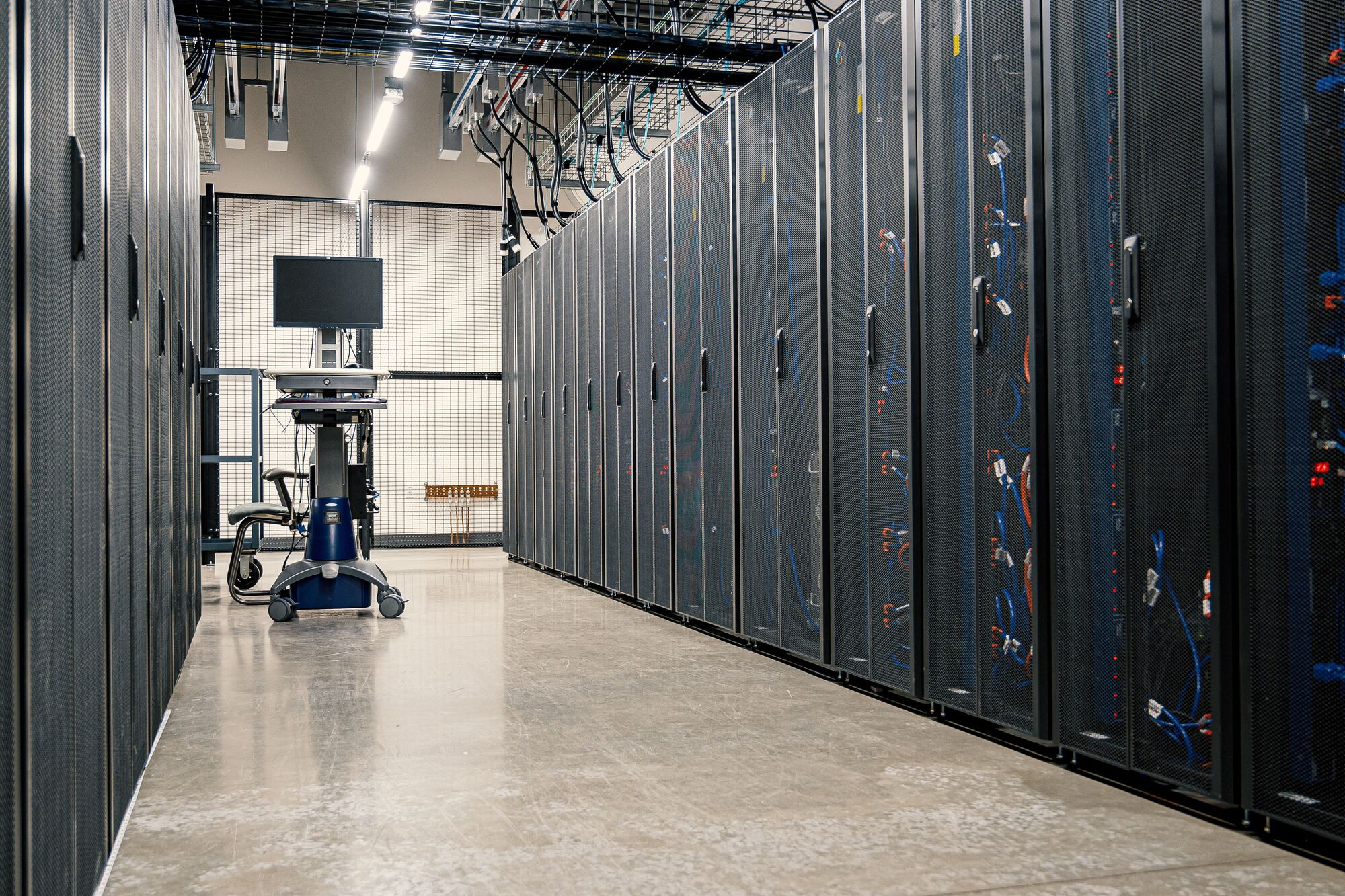
A clean data-hall aisle between rows of closed server racks, a crash cart at the far end.

Servers for networking: the roles a server plays

Most organisations now run a mix of on-premises servers and cloud services. These are the common server roles, and where each tends to run today:

Server roleWhat it doesWhere it usually runs
Domain controller and DNS serversSigns users in, applies policy and translates names to addresses; internal DNS servers forward other lookups to public resolvers such as Google Public DNSOn premises, usually beside a cloud identity service such as Entra ID
NTP serversKeep every clock on the network in step, which logs, sign-ins and certificates depend on, synchronised to public NTP servers in South Africa or abroadThe domain controller, firewall or core switch
File and print serversShared folders with permissions, and print queuesA server or NAS, increasingly SharePoint and OneDrive
Database and application serversAccounting, ERP and line-of-business systemsOn premises or in the cloud, depending on the software
Virtualisation hostsRun many virtual servers on one physical machine with Hyper-V, VMware or ProxmoxOn premises or in colocation
Proxy servers and web filtersFilter and log web traffic, which schools need for learnersThe firewall or a dedicated appliance
SMTP servers and mail relaysSend mail from scanners, printers and applicationsUsually a cloud relay; on premises for older systems
FTP serversExchange large files with other organisationsReplace plain FTP with SFTP or a secure portal
GSM gatewaysSend SMS alerts from monitoring and building systems over the mobile networkA small appliance beside the servers
Backup serversHold copies of every systemA NAS or server on site, plus an off-site copy

Where a role belongs in the cloud rather than in your server room, our cloud services team moves it there.

Rack servers, tower servers or a home server

Form factorFitsWatch for
Tower serverOffices without a server room; a single quiet serverFloor space; harder to scale
1U and 2U rack serversServer rooms and comms cabinets; the default for virtualisation and databasesNoise and heat; needs a rack, rails and cooling
4U rack serverMany drives, several GPUs or large storageWeight and power draw; plan the rack and UPS around it
Small or mini rack serverBranches, school admin blocks and retail storesLimited expansion; check its depth against the cabinet
Home servers and home NASA home office, or a Plex media serverConsumer-grade parts and no redundancy; not for company data

We deliver a server rack with servers already mounted, cabled and labelled: the cabinet, the rails for each server rack mount, the patch panels and the UPS arrive as one designed system, and the rack elevation goes into your documentation.

Server racks, cabinets and the server room

A server rack is a standard 19-inch frame, measured in rack units, that holds servers, switches, patch panels and power distribution. Choosing an IT server rack or rack server cabinet comes down to three decisions: the height in rack units, from a wall-mount cabinet for a small branch to a full-height floor-standing cabinet; the depth, enough for the deepest server plus cabling room; and whether the cabinet is open-frame or lockable with perforated doors for airflow.

The server room around the rack matters as much: dedicated circuits, cooling that copes with a Highveld summer, fire detection, access control and a server rack UPS that bridges the switch to an inverter or generator and shuts servers down cleanly if that fails. Load-shedding makes power the first reliability factor for any server, new or refurbished. Where a building cannot give servers a safe home, we place and manage the equipment in a South African colocation data centre; see data centre and colocation services.

A technician patches network cables into a switch in an open rack.

NAS storage: network attached storage explained

What is NAS storage? A NAS, or network attached storage device, is a storage appliance on the network that shares files and holds backups for many users, managed through a web interface rather than a full server operating system. Storage devices of this kind, Synology NAS storage among them, range from 2-bay desktop units to rackmount arrays holding dozens of drives.

A NAS is the simpler choice when the job is file sharing and backups; a server is needed for user management, databases or virtual machines. A common pattern for 10 to 50 users is one server for applications and a NAS as the on-site backup target. Larger estates add a storage area network (SAN), which presents block storage to virtualisation hosts over a dedicated network, where a NAS shares files.

Hard drives and solid state drives do different jobs. Hard drives in computers and NAS units still give the lowest cost per terabyte for archives and backups; SSDs give databases and virtual machines their speed, and SSD NAS storage suits busy shared folders. We configure RAID so one failed drive does not stop work, and pair every NAS with an off-site copy, because RAID is not a backup; see backup and disaster recovery.

A technician patches network cables into a switch in an open rack.

New, certified refurbished or pre-owned servers

NewCertified refurbishedPre-owned
Best forCritical systems, current-generation features and the longest service lifeStrong specifications on a tighter budget, failover and secondary serversTest, lab and non-critical roles
Server Hub local warranty12 months12 months90 days
AvailabilityOften built to orderOften from local stockFrom local stock
Check firstLead time on custom buildsProcessor generation support for your hypervisor or Windows Server versionRemaining life and spares

Every warranty is in addition to your rights under the Consumer Protection Act. Refurbished servers are a sound choice when they are certified: tested, updated, with failing parts replaced, previous data wiped and a local warranty behind them. Server Hub's guide are refurbished servers worth it?  (opens serverhub.co.za) sets out the trade-offs, and what server a small business needs  (opens serverhub.co.za) covers the smaller end.

What drives the cost of a server

Servers for sale online are priced on the box. What an organisation pays over five years depends on more:

  • Processors and sockets. Core count drives performance and per-core software licensing, and a current single-socket server can replace an older dual-socket pair.
  • Memory, drives and the RAID controller, usually the largest variables in a configuration.
  • New or refurbished, and the warranty that comes with each.
  • The exchange rate. Imported hardware moves with the rand, so the quote should be dated and valid for a stated period.
  • Licensing. Windows Server is licensed per core, with client access licences per user or device, and virtualisation changes the count.
  • Power and cooling. Electricity, a UPS sized for load-shedding and cooling for the room.
  • Installation, management and retirement. Racking, configuration, monitoring, patching and secure disposal.

We do not publish server prices here, because the configuration drives them. For current rand price bands, Server Hub publishes how much a server costs in South Africa  (opens serverhub.co.za), a guide to the best enterprise servers of 2026  (opens serverhub.co.za) and five checks on where to buy a server in South Africa  (opens serverhub.co.za). Computer servers for sale with an overseas warranty can cost more once freight, duties and downtime are counted.

How we deliver servers and IT hardware

  1. Assess

    We record what you run, what it runs on and where it is failing, and agree requirements, growth and your budget cycle.

  2. Specify

    We size each server, storage device, rack and UPS for its workload, choose new, refurbished or cloud for each role, and write down the reasons.

  3. Quote

    Server Hub prices every line in rand with VAT included, checks each against a dated source, and states how long the quotation is valid, so a bid committee compares like for like.

  4. Configure and test

    Units are built to the specification, updated and bench-tested before dispatch.

  5. Install

    We rack, cable, label and power the equipment under change control, migrate the workloads and test failover and shutdown on the UPS.

  6. Hand over

    Rack elevations, configuration records, credentials, warranty details and the asset register are yours.

  7. Manage

    Servers join our monitoring, which checks each machine every 15 minutes and logs faults as tickets, under your SLA. See server and infrastructure management.

  8. Refresh and retire

    We plan replacement before end of support, and wipe or destroy drives before disposal, recorded in the asset register. See IT procurement and lifecycle management.

Risks we design out

  • The wrong specification. One model number covers machines of very different power, so we check every configuration line against the manufacturer's datasheet, not a listing title.
  • Warranties you cannot claim locally. An overseas warranty means freight, duties and weeks without the server; Server Hub's warranty is local.
  • Power damage and corruption. Servers sit on a correctly sized UPS, with automatic clean shutdown tested before handover.
  • Heat. Rooms and cabinets are planned for airflow and cooling before the servers arrive.
  • Data on retired drives. Drives are wiped or destroyed before disposal, as POPIA's security safeguards (section 19) require.
  • Lock-in. Credentials, licence records and documentation belong to you, not to us.

Governance, compliance and procurement

  • Governance and reporting. Every unit we supply and manage is recorded in your asset register with its owner, location, warranty and end-of-support date; warranty and lifecycle status appear in the monthly service review; changes to production servers go through change control. See IT governance, risk and compliance.
  • Compliance. POPIA security safeguards through encryption, access control and secure disposal; PFMA and MFMA asset and procurement disciplines for public bodies; King IV Principle 12 for boards governing technology and information.
  • Procurement fit. Arke Technologies (Pty) Ltd is a Level 1 B-BBEE contributor (sworn affidavit available on request), giving buyers 135% procurement recognition. Company documents, our CSD supplier number and SARS tax compliance status are available on request. Buy on a quotation against your purchase order, on a proposal and SLA, or through a tender, for which we complete the standard bidding documents (SBD forms).
  • Continuity. A single server room and a multi-site estate run on the same documentation and support model, delivered remote-first by a certified team under one contract and SLA. If you change provider, the hardware, credentials, documentation and warranty records go with you. Security for the estate sits with our cybersecurity services.

Frequently asked questions

What is a server? Show answer

A server is a computer, or a program running on one, that provides a service to other devices on a network, such as files, email, databases, websites or sign-in. Server hardware is built to run continuously, with redundant power supplies, error-correcting memory and drives that can be swapped while it runs, and it is managed remotely. The devices that use a server are its clients.

What is the difference between a rack server and a tower server? Show answer

A rack server is a flat unit that mounts in a standard 19-inch rack cabinet and is measured in rack units, such as 1U, 2U or 4U; a tower server stands upright like a large desktop. Rack servers suit server rooms and scale neatly in one cabinet, while tower servers run quieter and suit offices without a cooled room.

What is NAS storage used for? Show answer

NAS storage is used to share files and hold backups on a network. A network attached storage device is simpler and cheaper to run than a server, and many organisations use one as the on-site backup target beside their application server. It does not replace a server for user management, databases or virtual machines, and it does not replace an off-site backup.

Are refurbished servers worth it? Show answer

Yes, when they are certified refurbished and warranted locally. A certified refurbished server has been tested, updated and wiped, with failing parts replaced, and it delivers strong specifications on a smaller budget. Server Hub gives certified refurbished servers the same 12-month local warranty as new ones. Check that the processor generation supports your hypervisor or Windows Server version first.

How much does a server cost in South Africa? Show answer

A server's cost depends mostly on its configuration: processors, memory, drives, the RAID controller, networking, and whether it is new or refurbished. Licensing, a UPS, installation and several years of power and support add to the price of the box. Server Hub publishes current rand price bands by server class and quotes each configuration in rand with VAT included.

What size UPS does a server rack need? Show answer

A server rack UPS must carry the full load of the rack long enough to bridge the switch to an inverter or generator, then shut the servers down cleanly if backup power fails. We size it from the measured load of the servers, storage and switches, add headroom for growth, and test the automatic shutdown before handover, because load-shedding makes this the likeliest failure.

What are the best notebooks and laptops for work? Show answer

The best work laptops are the ones matched to each role. Administrative staff and learners are well served by an entry-level 15.6-inch notebook PC in the class of the HP 250 G9, while engineers and analysts need more memory and processing power. We standardise a few specifications, choose SSD over HDD storage for speed, and manage every device centrally.

Where can organisations buy servers in South Africa? Show answer

Organisations can buy servers from local stock, sourced to order through a South African supplier that lands them in rand, or from overseas listings they import themselves. We supply through Server Hub, which quotes in rand with VAT included and warrants every unit locally. Compare the warranty's location, the delivered price, a verified configuration and a dated quote.

Tell us what you need to run

Send us the workloads, users and sites, and we will specify the servers, storage and racks, quote them through Server Hub and plan the installation and support.